Treatment plan summary template
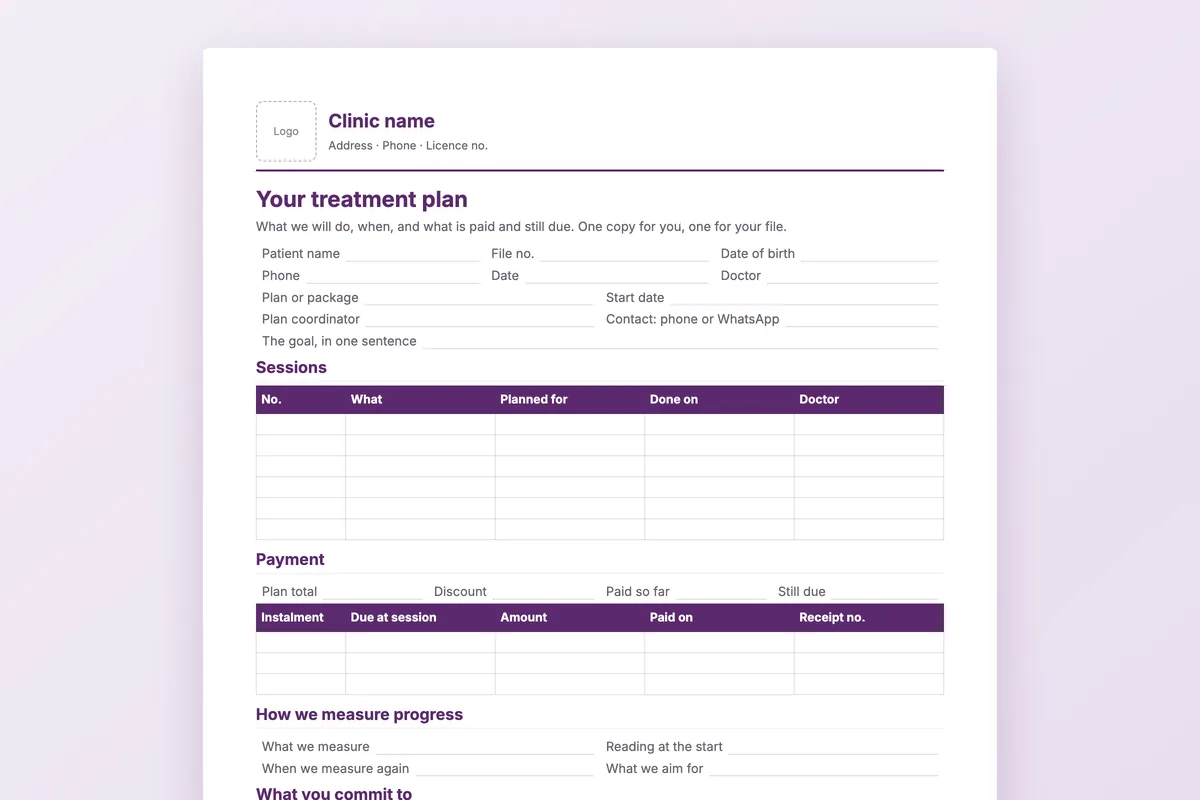
One page the patient takes home when they agree to a course of treatment: what will happen and when, what is paid and what is still due, and what both sides commit to.
Download
- Word · English.docx · 38 KB
- PDF · English.pdf · 181 KB
- Word · Arabic.docx · 38 KB
- PDF · Arabic.pdf · 54 KB
FreeNo sign-upDownloads directly
Rather fill it in on screen? Treatment quotation generator
What is on the page
| Header | Your letterhead, the patient details, the plan or package, start date, the plan coordinator and a contact number. |
|---|---|
| The goal | One sentence the patient understands. |
| Sessions | A table with the session number, what will be done, the planned date, the date it was done and the doctor. |
| Payment | Plan total, discount, paid so far and still due, then instalments tied to sessions with amount, date paid and receipt number. |
| Progress, commitments and policy | What is measured and when, what the patient commits to, the clinic’s policy on moving appointments, pausing and cancelling, and both signatures. |
How to use it
Write your policy once
Open the Word file and fill in your cancellation, pause and refund lines, then save it as your clinic’s version.
Fill it in at the consultation
Write the goal, the sessions and the payment schedule while the patient is still in the room.
Sign two copies
The patient and the doctor sign; one copy goes home, one goes in the file.
Update it at each session
Write the date in the “Done on” column and record each payment against its instalment.
Who it is for
Clinics that sell a course rather than a visit: laser, dermatology and aesthetics, physiotherapy, nutrition and weight management. The Arabic file runs right to left; the English file is the same page in English.
Read next
Plans & packages
Price a course rather than a visit. Medicolize tracks sessions, packages and progress from the first consultation to the last appointment…
Read more From the blogRunning a course of treatment, not eight appointments
A block of sessions is one thing with eight parts. Almost every system treats it as eight things, and everything downstream inherits that mistake.
Read moreMore free files
Questions
Why tie instalments to sessions?
The patient pays as the course moves forward, and both sides can see at any session what has been delivered and what has been paid.
Does it include a cancellation policy?
It has three lines for your own policy on moving appointments, pausing the plan and refunds. The wording is yours to set.
Is it a quotation?
It is the plan after the patient agrees. For the price before they agree, use the free quotation tool.
Can I add more sessions?
Yes. Add rows to the sessions table in Word; the page will run onto a second sheet if the plan is long.
Plans that draw down as sessions happen
In Medicolize the plan is approved and signed online by the patient, instalments sit against the package, and each session draws down from what was paid. Thirty minutes on your own clinic.