Appointment card template
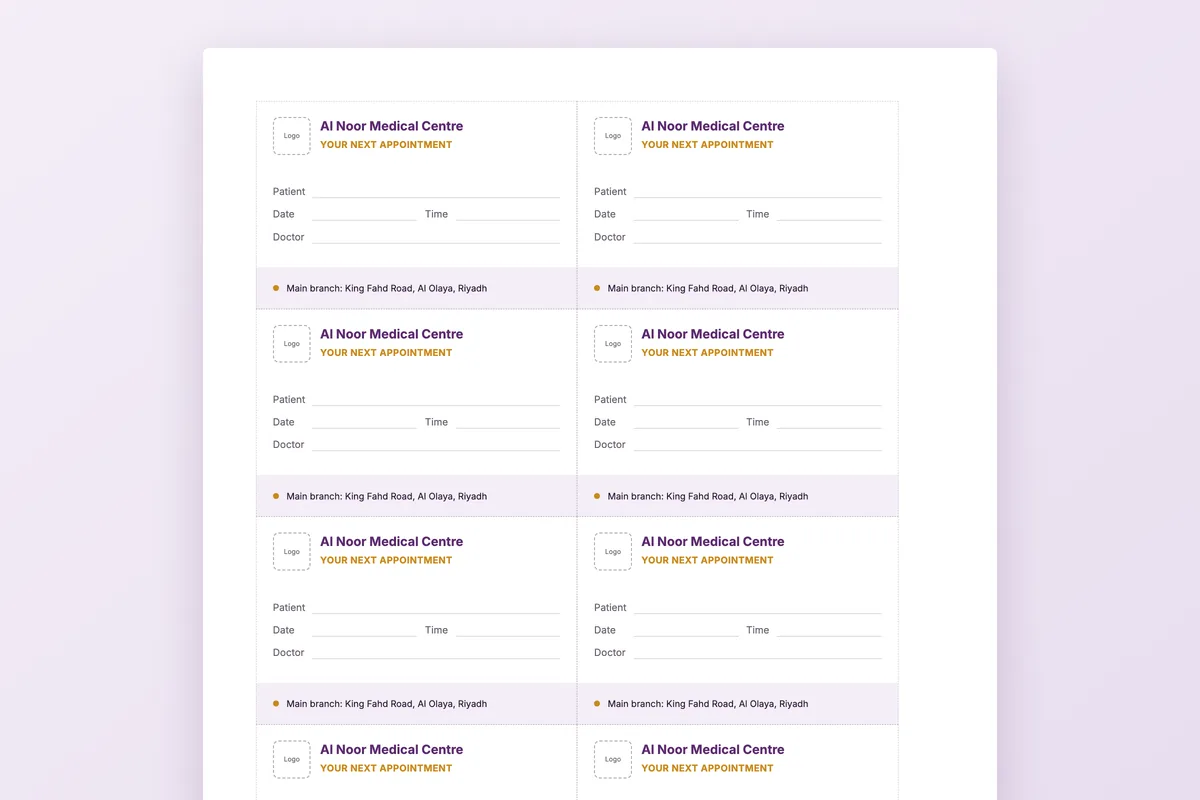
The card the front desk fills in before the patient leaves. Ten to a sheet at business-card size, with a back that asks the patient to confirm, arrive early and give notice.
Download
- Word · English.docx · 39 KB
- PDF · English.pdf · 340 KB
- Word · Arabic.docx · 40 KB
- PDF · Arabic.pdf · 170 KB
FreeNo sign-upDownloads directly
Rather fill it in on screen? Appointment card generator
What is in the file
| Page 1: fronts | Ten cards with a small logo box, the clinic name, “Your next appointment”, lines for patient, date, time and doctor, and the branch address. |
|---|---|
| Page 2: backs | “Confirm or reschedule on WhatsApp” with the number, “Please arrive 10 minutes early”, and one line on cancelling 24 hours ahead. |
| Page 3: printing | How to print double-sided at actual size, which card stock to use and how to cut. |
| Cut lines | Grey dashed lines around each 85 × 55 mm card. |
How to use it
Put in your details
Use Find and Replace in Word to change the clinic name, address and WhatsApp number on all ten cards at once.
Print both sides
Print page 1, put the sheets back and print page 2 on the reverse, at 100%.
Cut
Cut along the dashed lines with a paper trimmer.
Fill in at the desk
Write the name, date, time and doctor before the patient leaves, and say the time out loud as you hand it over.
Who it is for
Clinics that book the next visit at the desk: physiotherapy courses, dermatology and laser sessions, follow-ups and recall visits. Works alongside WhatsApp reminders, not instead of them.
Questions
What size are the cards?
85 × 55 mm, the usual business-card size, ten to an A4 sheet. Print at 100% so they stay that size.
Which paper should I use?
Card stock of 250 to 300 gsm feeds through most office printers and holds up in a wallet.
Do the backs line up?
Every back is the same, so the cards work whichever way you turn the sheet for the second side.
Can I change the cancellation notice?
Yes. Write the notice period your clinic actually works to; the back is plain text in Word.
The reminder that does not depend on a card
In Medicolize the confirmation and reminders go out by WhatsApp, and the patient confirms, cancels or reschedules in one tap, so the slot can go to someone else. Thirty minutes on your own clinic.