Staff roster and leave tracker template
A month grid that catches the two things owners miss: an evening with too few people on it, and someone working well past their hours. Leave goes in once and shows on the roster by itself.
Download
FreeNo sign-upDownloads directlyExcel and Google Sheets
What is inside
| Settings | Working days, shift codes with their times and hours, staff with role, branch, weekly hour limit, leave entitlement and phone, and the minimum number per shift, role and branch. |
|---|---|
| Shift plan | Staff grouped by branch against the days of the month, one shift code per cell from a list, closed days shaded. |
| Leave | Each request with type, dates, working days, who approved it and its status. Two requests that overlap at the same branch are flagged. |
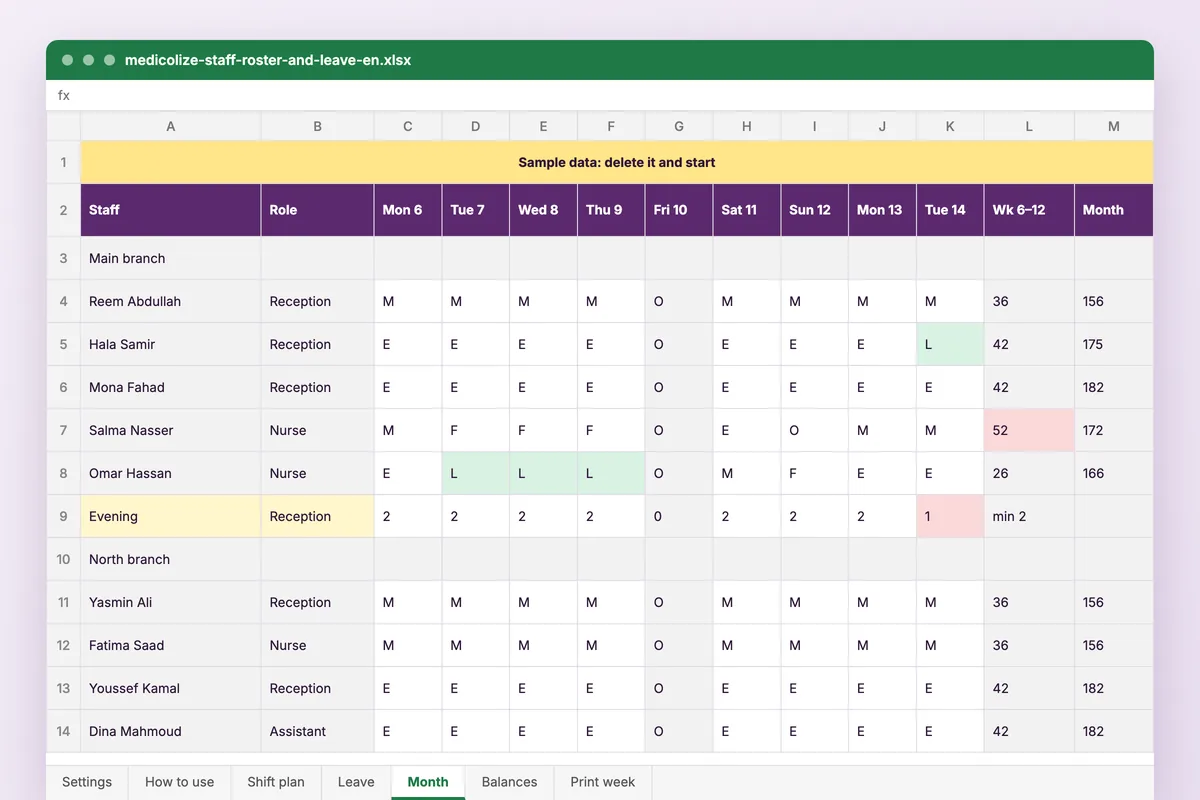
| Month | The plan with approved leave written over it, coloured by code. Hours per week and per month for each person, red when over their limit, and a count per shift and role for each day, red when below the minimum. |
| Balances | Entitlement, days taken, days pending and days left for each person, with sick days this year. |
| Print week | Pick a branch and a week: names, roles, phones and shifts on one landscape A4 page for the notice board. |
How to use it
Set up the team
Working days, shifts, staff and the minimum cover per shift and role.
Plan the month
Type a shift code for each person and day on the shift plan.
Log the leave
Record each request; once approved it shows on the month by itself.
Check the red cells
Fix any shift below the minimum and anyone over their hours, then print the week.
Who it is for
Clinic managers who build the roster in a spreadsheet and approve leave by message. The file opens on July 2026 at a two-branch clinic with nine staff, and two problems show straight away: on Tuesday 14th the main branch has one receptionist in the evening, and a nurse is at 52 hours in the second week.
Questions
Does it work in Google Sheets?
Yes. Upload it to Google Drive and open it with Google Sheets. It uses COUNTIFS, SUMIFS, INDEX, MATCH and NETWORKDAYS.INTL, which both handle.
Can I change the currency?
This roster counts hours and days, not money, so there is no currency cell. The other templates keep it on their Settings sheet.
Is my data stored anywhere?
No. The file is yours, on your computer or your own Drive. Nothing you type reaches Medicolize.
Why are the plan and the month two sheets?
A cell cannot be typed into and worked out at the same time. You type the plan; the month adds the approved leave, the hours and the staffing checks.
Rotas, leave and attendance in one place
In Medicolize shifts are set per branch and role, leave requests are approved in the system, and attendance feeds payroll directly. Thirty minutes on your own clinic.