Appointment book and room schedule template
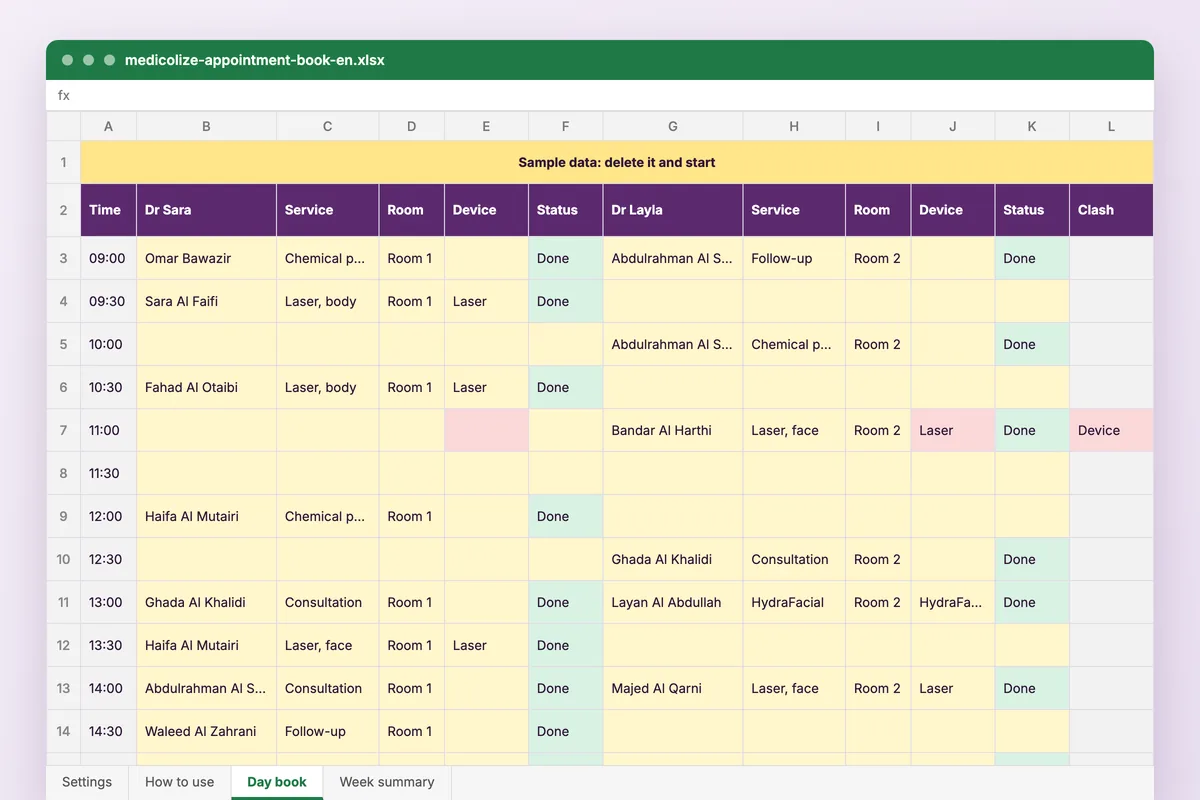
For clinics still booking on paper. One block per doctor, a row per time slot, and a check that stops two doctors using the same room or laser at the same time.
Download
FreeNo sign-upDownloads directlyExcel and Google Sheets
What is inside
| Settings | Doctors, rooms, devices, services with their length, the slot length, opening hours and the days the clinic is open. |
|---|---|
| Day book | A week of time rows at your slot length, with a block per doctor: patient, phone, service, room, device and status. A booking holds its room and device for the full length of the service, and a clash is coloured red. |
| Week summary | Bookings per doctor by status, booked and available slots, occupancy and no-show rate, and the numbers to copy into the clinic KPI dashboard. |
How to use it
Set up the clinic
Doctors, rooms, devices, services with their minutes, and your hours.
Book on the start time
Enter each appointment on the row it starts; the length comes from the service.
Update the status
Booked, confirmed, arrived, done, no-show or cancelled, through the day.
Close the week
Read the summary, save a copy, then clear the bookings for the next week.
Who it is for
Reception teams moving off a paper diary, and clinics where one laser or one treatment room is shared between doctors. The sample week has three doctors and two laser clashes, on Monday at 11:00 and Wednesday at 17:00, both shown in red.
Read next
Scheduling
Book across doctors, rooms and branches without double-booking. Medicolize handles recurring sessions, waiting lists and online reservation.
Read more From the blogOnline booking for clinics: what to open to patients and what to keep at the desk
Most reception calls are one question: when is there an appointment? Online booking answers it without a call. But a clinic that opens its…
Read moreMore free files
Questions
Does it work in Google Sheets?
Yes. Upload it to Google Drive and open it with Google Sheets. The clash check uses ordinary formulas and colours, with no macros.
Can I change the currency?
Yes. The currency is one cell on the Settings sheet, with ر.س, ج.م, د.ك, د.إ and د.ب in the list.
Is my data stored anywhere?
No. The file is yours, on your computer or your own Drive. Patient names and phones you type never reach Medicolize.
Can I use 15-minute slots?
Yes. Set the slot length on Settings before you enter bookings. The day book holds up to 48 slots a day.
One diary that checks the room and the device
Medicolize checks the doctor, the room and the equipment together when a booking is made, uses each service’s own length, and colours the day by status. Thirty minutes on your own clinic.