Deferred revenue register for packages
Money taken for sessions not yet given is not revenue yet. This register shows, package by package, what has been earned, what is still owed in sessions, and which patients have stopped coming.
Download
FreeNo sign-upDownloads directlyExcel and Google Sheets
What is inside
| Settings | Clinic name, currency, the date the register is read on, and your package types with sessions, price and how many days without a session make a package stalled. |
|---|---|
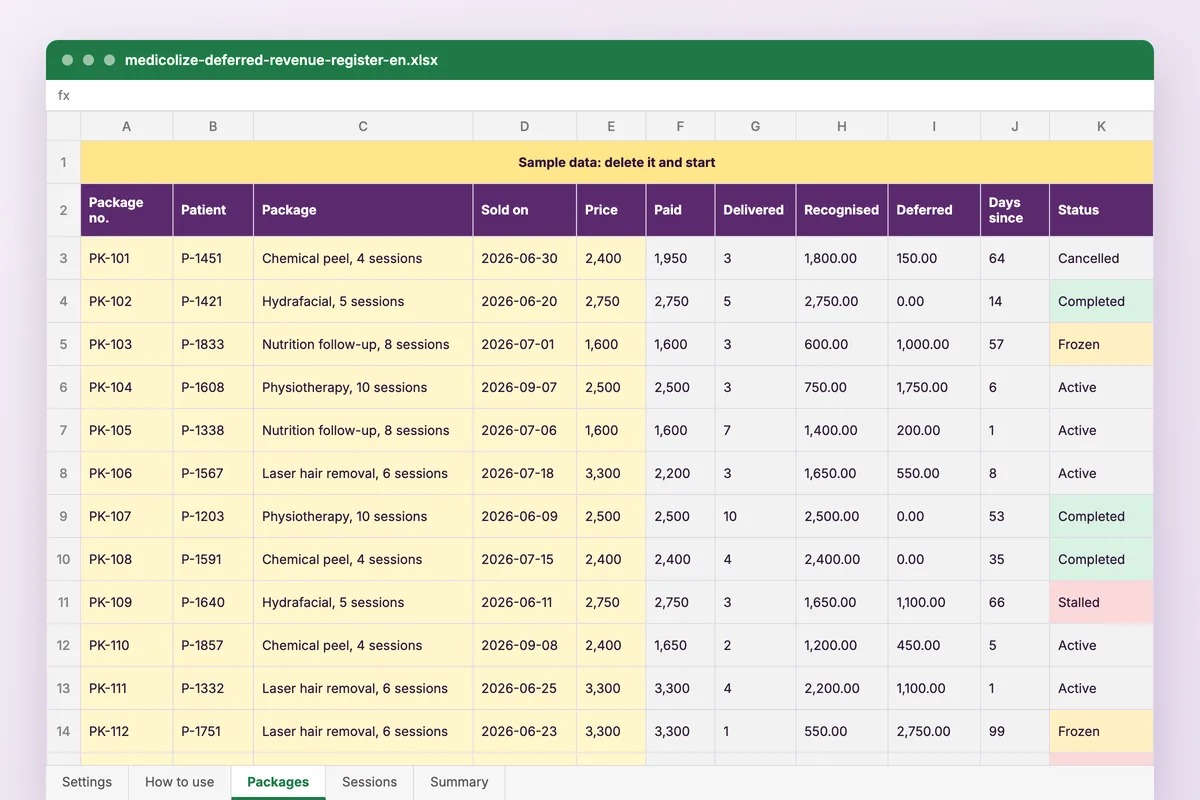
| Packages | One row per package sold: patient code, mobile, type, date sold, price and paid to date. Sessions delivered and remaining, revenue recognised, deferred amount, last session, days since it and status are worked out. Freeze or cancel from one column. |
| Sessions | Date, package number, doctor. The patient, package and session number fill in. |
| Summary | Deferred balance in total and by package type, completion by type, and up to 20 stalled packages, largest deferred amount first, with mobile numbers for reception. |
How to use it
List your packages
Each type with its sessions, price and the days that count as stalled.
Log each sale
Package number, patient, type, price and what has been paid.
Log each session
Date and package number. Everything else counts itself.
Call the stalled list
Reception works down the summary, largest amount first.
Who it is for
Clinics that sell courses of sessions paid upfront or in instalments: laser, skin care, physiotherapy, nutrition. The sample holds 60 packages sold from June to September 2026, read on 30 September; 9 have stalled, and the summary lists them by the amount still owed.
Read next
Plans & packages
Price a course rather than a visit. Medicolize tracks sessions, packages and progress from the first consultation to the last appointment…
Read more From the blogRunning a course of treatment, not eight appointments
A block of sessions is one thing with eight parts. Almost every system treats it as eight things, and everything downstream inherits that mistake.
Read moreMore free files
Questions
Does it work in Google Sheets?
Yes. Upload it to Google Drive and open it with Google Sheets. It uses COUNTIFS, SUMIFS, INDEX, MATCH and LARGE, which both handle.
Can I change the currency?
Yes. Pick it on the Settings sheet. The amounts are numbers, so the sums do not change.
Is my data stored anywhere?
No. The file is yours, on your computer or your own Drive. Nothing you type reaches Medicolize.
How is revenue recognised?
In equal parts per session: price × sessions delivered ÷ sessions in the package. Deferred is what was paid less what was recognised. A negative figure means the patient has had more sessions than they paid for.
Every package tracked from the visit
In Medicolize each session is taken off the patient’s treatment plan when the visit is recorded and payments sit against the same plan, so what is paid, delivered and still owed is on the patient file. Thirty minutes on your own clinic.