Clinic profit and loss template
A monthly income statement for each branch and for the whole clinic, over twelve months. It also answers the question owners ask most: how much revenue a month needs, and on which day it gets there.
Download
FreeNo sign-upDownloads directlyExcel and Google Sheets
What is inside
| Settings | Branches and their rooms, working days in each month, your service groups, fixed cost lines, variable cost lines and the payment fee rate. |
|---|---|
| Revenue | One row per month and branch: revenue by service group, packages sold but not yet delivered, and earlier packages delivered this month. Revenue recognised is worked out. |
| Expenses | One row per month and branch with each cost line. Payment fees and the fixed and variable totals are worked out. |
| Income statement | Revenue, variable costs, contribution, fixed costs, operating profit and margin, per branch and consolidated, twelve months side by side. A month at a loss is red. |
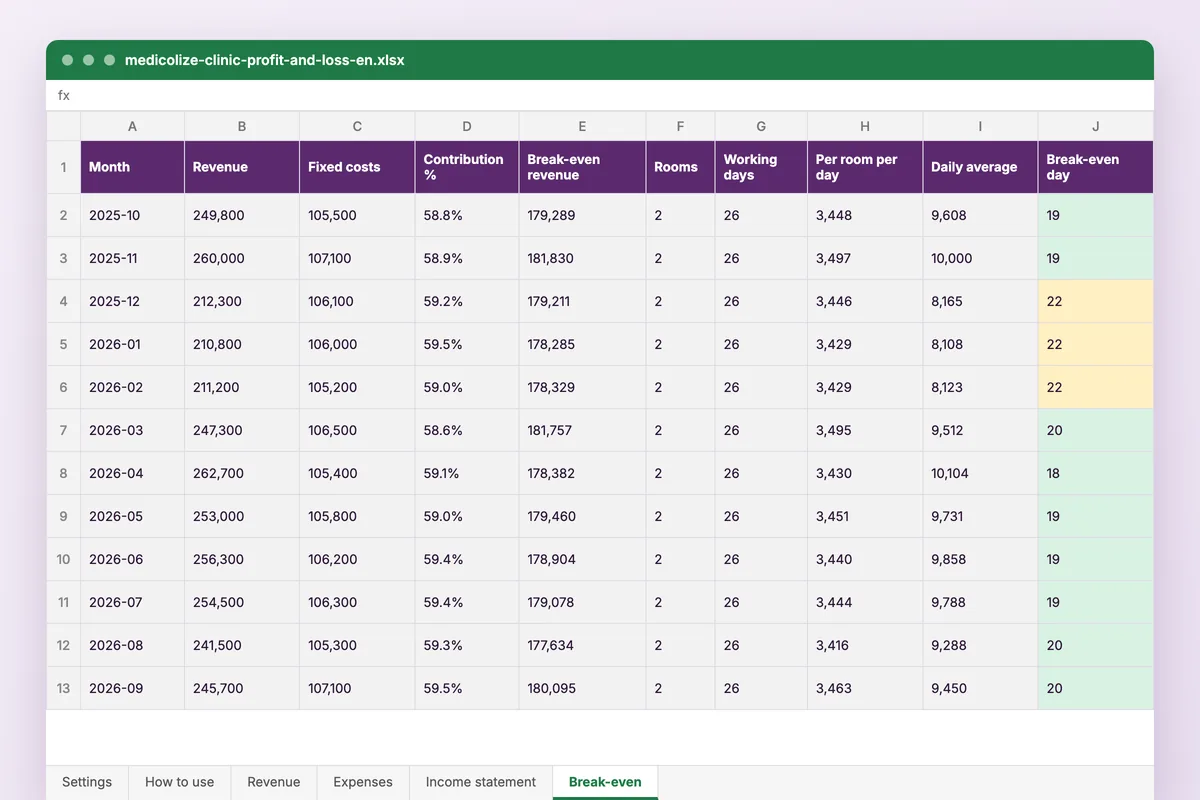
| Break-even | Break-even revenue for each month, the same figure per room per working day, and the working day on which the month covers its costs, with a chart by branch. |
How to use it
Set up the clinic
Branches, rooms, working days and the names of your cost lines.
Enter the revenue
Each month and branch, by service group, with the package adjustment.
Enter the costs
Each month and branch, line by line, from your accounts.
Read the results
The income statement and the break-even day fill themselves.
Who it is for
Owners and finance managers who want to see each branch’s profit month by month, not just the year-end total. It opens on a sample clinic with two branches over twelve months. The North branch covers its costs by about day 19 most months, but in December, January and February only on day 22, and the chart makes the gap plain.
Read next
Profitability
Revenue, cost and profit per branch, department and doctor, updating as the day runs. Medicolize shows clinic owners where the money actually is.
Read more From the blogHow to run a profitable clinic
Revenue is the number most clinics watch and the one that explains least. Four others decide whether a busy clinic is a profitable one.
Read moreMore free files
Questions
Does it work in Google Sheets?
Yes. Upload it to Google Drive and open it with Google Sheets. It uses SUMIFS, INDEX, EDATE and ROUNDUP, which both handle.
Can I change the currency?
Yes. Pick it once on the Settings sheet and every sheet shows it.
Why are packages adjusted?
A package paid for this month but delivered over the next few is not this month’s revenue yet. The adjustment takes out what is not delivered and adds back sessions delivered from earlier packages, so a month of strong package sales does not look better than it was.
Is my data stored anywhere?
No. The file is yours, on your computer or your own Drive. Nothing you type reaches Medicolize.
Profit by branch, without the month-end spreadsheet
Medicolize works out profit by branch from the invoices, expenses and doctor shares already recorded, with package money kept apart until it is delivered. Thirty minutes on your own clinic.