

How Patient Reminders Reduce No-Shows & Cancellations
No-show appointments and last-minute cancellations are among the most common challenges clinics face every day.
A patient may forget an appointment, arrive late, or cancel only a few hours before their scheduled visit, this is where effective patient reminders can make a major difference.
Instead of relying on patients to remember every appointment, clinics can use automated patient reminders to keep appointments visible and reduce the chances of patients forgetting them.
When reminders are combined with a reliable doctor appointment system, clinics can create a smoother appointment process for both patients and staff.
Why Do Patients Miss Their Appointments?
Not every no-show means that a patient does not care about their appointment.
In many cases, patients simply forget, people have busy schedules, work commitments, family responsibilities, and unexpected situations.
An appointment that was booked several days or weeks ago can easily disappear from a patient’s mind.
A simple reminder before the appointment can bring the booking back to the patient’s attention and give them enough time to confirm, reschedule, or cancel.
The Real Cost of No-Show Appointments
When a patient does not show up, the doctor may have an empty slot that could have been given to another patient, and the reception team also loses time because the appointment was reserved, prepared for, and then missed.
Over time, repeated no-shows can have a direct impact on clinic revenue.
Using a doctor appointment system helps clinics organize their schedules, but appointment management becomes even more effective when the system is connected to automated patient reminders.
How Patient Reminders Help Reduce No-Shows
The main purpose of patient reminders is simple, remind patients before they forget.
Instead of sending one reminder at the last minute, clinics can create a structured reminder journey, for example, a clinic can send a reminder several days before the appointment.
Another reminder can be sent one day before the visit, a final notification can be sent closer to the appointment time.
This approach keeps the appointment fresh in the patient’s mind without requiring the reception team to manually contact every patient, with automated patient reminders, staff can spend less time making repetitive confirmation calls.
Send Reminders at the Right Time
Timing is one of the most important parts of an effective reminder strategy, a reminder sent too early may be forgotten, and a reminder sent too late may not give the patient enough time to make changes.
A doctor appointment system can help clinics create reminder schedules based on appointment dates and times, for example, a patient could receive a confirmation immediately after booking.
They could then receive another reminder 24 or 48 hours before the appointment, a final reminder can be sent on the day of the visit.
The exact timing can depend on the clinic, specialty, appointment type, and patient behavior.
Make Patient Reminders Easy to Understand
Patients should immediately understand what the message is about.
An effective reminder should include the important appointment details.
These may include the patient’s name, doctor’s name, appointment date, appointment time, and clinic information.
If possible, the reminder should also make it easy for the patient to confirm or request a change.
Clear patient reminders reduce confusion and make the appointment process easier.
Give Patients an Easy Way to Reschedule
The goal should not always be to eliminate cancellations completely.
Instead, clinics should try to reduce last-minute cancellations and turn them into early cancellations or rescheduled appointments.
This gives the clinic more time to fill the available slot.
A smart doctor appointment system can support this process by making appointment changes easier to manage.
When patients can quickly communicate that they cannot attend, clinics can react faster.
Patient Reminders Can Improve the Patient Experience
Good appointment management is not only about protecting clinic revenue, It is also about creating a better patient experience.
Patients appreciate clinics that communicate clearly, they do not want to remember every appointment detail themselves.
Receiving helpful patient reminders gives patients confidence that the clinic is organized.
It also reduces the stress of wondering whether they booked the correct date or time.
Use Automation Instead of Manual Follow-Ups
Imagine a reception team managing dozens or hundreds of appointments every week, calling every patient individually takes time.
There is also a higher chance that some patients will be missed, this is where a doctor appointment system becomes valuable.
Automation allows the clinic to send patient reminders based on predefined appointment rules.
The team does not have to remember who needs a reminder and when, the system handles the repetitive work while staff remain available for more important tasks.
Connect Patient Reminders With Your Appointment System
Using reminders separately from appointment management can create unnecessary work.
The better approach is to connect patient reminders directly with the clinic’s appointment workflow, when a new appointment is created, the system can automatically trigger the appropriate notifications.
If an appointment is changed, the reminder information can be updated.
If an appointment is canceled, unnecessary reminders should no longer be sent.
This connection makes the entire process more accurate, a doctor appointment system can therefore become more than a scheduling tool.
It can become part of a complete patient communication workflow.
How Clinic Appointment Software Helps With Patient No-Shows
Clinic appointment software patient no-shows management can help clinics monitor missed appointments and identify patterns.
For example, a clinic may discover that no-shows are more common for certain appointment types, It may also find that some patients repeatedly miss appointments without confirming.
These insights can help clinic managers create better reminder strategies, instead of treating every appointment in the same way, clinics can use data to improve their approach.
Identify Patients With a History of No-Shows
Not every patient has the same behavior, some patients always arrive on time.
Others may repeatedly cancel or miss appointments,tracking appointment history allows clinics to identify these patterns.
With clinic appointment software, patient no shows data can become easier to review and analyze.
The clinic can then prioritize communication with patients who are more likely to miss their appointments, this does not mean sending unnecessary messages to everyone.
It means using appointment data to make communication more relevant.
Turn Canceled Appointments Into New Opportunities
If a patient cancels early enough, the clinic may have an opportunity to offer the appointment slot to another patient.
For example, a clinic can review patients who are waiting for an earlier appointment.
When a slot becomes available, the reception team can contact an appropriate patient.
This approach can help reduce the impact of cancellations, with a well-organized doctor appointment system makes it easier to see available slots and manage changes quickly.
Monitor Your No-Show Rate
You cannot improve what you do not measure, clinics should track their no-show rate regularly.
A simple calculation can show how many scheduled appointments were missed during a specific period.
For example:
No-Show Rate = Missed Appointments ÷ Total Scheduled Appointments × 100
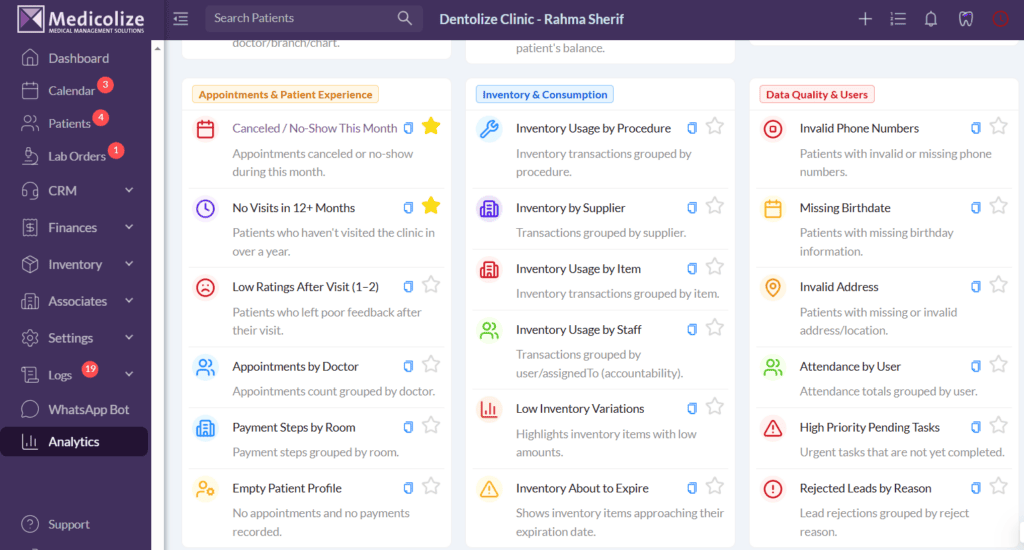
Tracking this number helps clinics understand whether their reminder strategy is working, With Medicolize, you don’t have to calculate it manually, you can view your total appointment and no-show numbers with just one click, making it easier to monitor performance and take action.
Create a Consistent Reminder Journey
Consistency matters.
Every patient should receive the right information at the right stage of their appointment journey.
A simple reminder journey could look like this:
Immediately after booking:
Send appointment confirmation and essential details.
48 hours before:
Send an early reminder and give the patient an opportunity to review the appointment.
24 hours before:
Send another patient reminder to reduce forgetfulness.
On the appointment day:
Send a final notification with the appointment time and relevant instructions.
This type of workflow reduces the need for manual follow-ups.
Personalize Your Patient Reminders
Automation does not mean every message has to feel generic.
Clinics can personalize their patient reminders with relevant patient and appointment information.
Using the patient’s name can make the communication feel more direct.
Including the doctor’s name and appointment time can also reduce confusion.
For some clinics, different appointment types may require different instructions.
A consultation, follow-up, medical procedure, or diagnostic appointment may each need specific information.
A flexible doctor appointment system can help organize these different communication requirements.
Reduce Reception Workload
Reception teams are often responsible for much more than appointment confirmation.
They answer calls, handle patient questions, manage payments, update records, and coordinate schedules.
Adding hundreds of manual reminder calls can increase pressure on the team.
Automated patient reminders can remove a large part of this repetitive workload.
Instead of spending hours contacting patients one by one, receptionists can focus on conversations that require human attention.
This can improve productivity while keeping patient communication consistent.
What Should Clinics Do Next?
Reducing no-shows is not about sending more messages.
It is about creating a smarter appointment process.
Start by understanding your current no-show and cancellation rates.
Then identify when and why patients are missing appointments.
Next, create a consistent reminder workflow.
Use automated patient reminders to reduce forgetfulness and give patients enough time to confirm or reschedule.
Finally, use your doctor appointment system to monitor the results and improve your process over time.
For clinics dealing with clinic appointment software patient no shows, the combination of automation, communication, and data can make appointment management much more efficient.
Final Thoughts
Reducing no-shows starts with better appointment management, with medicolize, clinics can use automated patient reminders and a smart doctor appointment system to keep patients informed, reduce missed appointments, and manage schedules more efficiently.
The result? Fewer empty slots, less work for your team, and a smoother patient experience.
